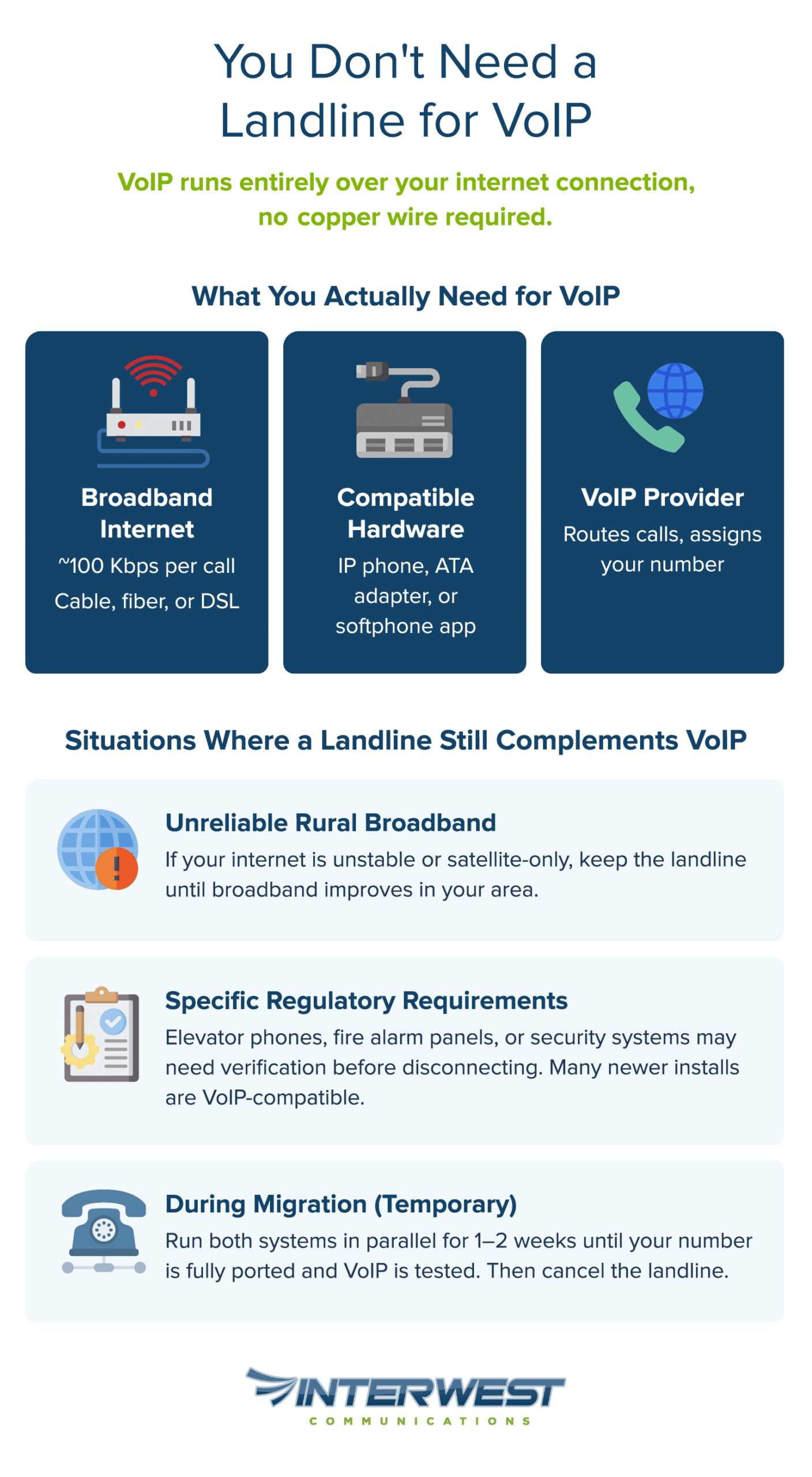
No — you do not need a landline for VoIP. VoIP (Voice over Internet Protocol) transmits your voice as digital data packets over your internet connection, bypassing the copper-wire infrastructure that traditional landlines depend on entirely. All you need is a stable broadband connection and compatible hardware — a VoIP desk phone, an analog telephone adapter (ATA) to use an existing handset, or a softphone app on your computer or smartphone.
Below, we’ll cover how VoIP works without a landline, what you need to get started, and how to evaluate whether the switch makes sense for your business or home.
Key Takeaways
No landline required. VoIP runs entirely over your internet connection — copper phone lines are architecturally irrelevant to how VoIP functions.
All you need is broadband. A stable internet connection with roughly 100 Kbps per call, compatible hardware (IP phone, ATA adapter, or softphone app), and a VoIP provider.
Significant cost savings. Traditional landlines run $40–$80+/month per line; VoIP typically costs $15–$45 per user/month — potentially saving a 10-seat office thousands annually.
Modern features landlines can’t deliver. Auto-attendant, voicemail-to-email, call analytics, CRM integration, and multi-device ringing come standard with VoIP.
Number porting is protected by federal law. The FCC requires carriers to facilitate number transfers, so you keep your existing phone number when you switch.
Edge cases exist but are narrow. Unreliable rural broadband, specific regulatory requirements, and short-term parallel operation during migration are the main reasons a landline might temporarily remain.
How VoIP Works Without a Landline
The two technologies use fundamentally different infrastructure. Once that distinction clicks, the rest of the decision gets simpler.
What VoIP Actually Does (And Why Copper Wires Aren’t Part of It)
VoIP converts your voice into small digital data packets and sends them over the internet to the person you’re calling, where they’re reassembled into audio in real time. It’s the same underlying principle behind video calls and streaming audio — optimized for two-way conversation.
Traditional landlines work nothing like this. They maintain a dedicated copper circuit between two phones for the entire duration of a call — infrastructure that phone companies have been laying since the late 1800s. VoIP doesn’t touch that copper network. It rides on the same broadband connection you already use for email, video, and everything else. Different infrastructure, different technology, zero overlap required.
This isn’t a workaround. VoIP was purpose-built to transmit voice over data networks. The core protocol that makes it work — SIP (Session Initiation Protocol) — was formalized by the Internet Engineering Task Force in June 2002 specifically to handle voice and multimedia sessions over IP networks. The copper landline isn’t just unnecessary; it’s architecturally irrelevant to how VoIP functions.
What VoIP Requires Instead
If not a landline, what does VoIP need? The list is short:
A stable internet connection. Broadband delivered via cable, fiber, or DSL — with roughly 100 Kbps of upload and download bandwidth per concurrent call. The FCC’s current broadband benchmark is 100 Mbps download / 20 Mbps upload, and approximately 93% of Americans have access to terrestrial fixed broadband at that speed — so a single VoIP call uses a tiny fraction of your available capacity.
Hardware (one of three options). A VoIP desk phone (also called an IP phone) that plugs directly into your network, an analog telephone adapter (ATA) that lets you use an existing traditional handset with VoIP service, or a softphone app installed on your computer, tablet, or smartphone. (Not sure if your current phone will work? — and yes, a VoIP phone works just like a regular phone for everyday calling.)
A VoIP service provider. The company that routes your calls over the internet, assigns your phone number, and delivers features and support behind the scenes.
No copper line installation, no phone company truck roll, no dedicated wiring in your walls.
When a Landline Might Still Sit Alongside VoIP
There are a few narrow scenarios where keeping a landline alongside VoIP still makes practical sense.
Rural or underserved broadband areas. If your internet connection is unreliable — particularly in areas limited to satellite with high latency — VoIP call quality will suffer. A landline may remain your primary voice line until broadband infrastructure improves. This is becoming less common as fixed wireless and fiber expansion continues, but it’s real for some addresses today.
Regulatory or compliance requirements. Certain industries and building codes still mandate dedicated communication lines for specific use cases — elevator emergency phones, monitored fire alarm systems, and some security panels. While these systems historically required POTS (Plain Old Telephone Service) lines, current safety codes like ASME A17.1 require two-way emergency communication without mandating copper specifically, and NFPA 72 has permitted cellular communicators as the sole means of fire alarm transmission since 2010. Many newer installations are VoIP- or cellular-compatible, but verify your specific system requirements before disconnecting.
Transitional parallel operation. Some businesses run both systems for one to two weeks during migration to ensure zero disruption. This is a best practice, not a permanent arrangement.
For the vast majority of businesses and homeowners, the landline is a bill you no longer need to pay.
Why Businesses and Homeowners Are Dropping Landlines for VoIP
Knowing you can drop the landline is one thing. Understanding why you’d want to is where the decision gains momentum. When you compare VoIP vs landline service, the reasons come down to three things people consistently care about most: cost, flexibility, and capability.
Cost Savings That Actually Add Up
Traditional POTS lines have gotten steadily more expensive as carriers shift investment away from copper maintenance toward fiber and wireless networks. AT&T alone spends $6 billion annually maintaining copper infrastructure that spans 500,000 square miles, yet only 5% of its customers still use copper voice service — with full copper retirement planned by 2029. Basic landline service now commonly runs $40–$80 per month per line — before adding features like call waiting, voicemail, or caller ID that come standard with most VoIP plans.
The savings compound as you scale. Adding a new landline means a physical installation — technician visit, wiring, recurring per-line charges. Adding a new VoIP line is a software configuration that takes minutes. For a 10-person office, the difference between maintaining ten POTS lines and ten VoIP seats can represent thousands of dollars annually in reduced service fees, eliminated maintenance contracts, and lower hardware costs.
A landline is anchored to a physical location. A VoIP number isn’t.
Your sales rep at the office and your support lead working from home both answer the same business line — no one calling in knows the difference. Calls ring simultaneously on a desk phone, a laptop, and a smartphone. Employees carry their business identity with them without forwarding hacks or handing out personal cell numbers.
Number portability makes the transition smoother than most people expect. When you switch from landline to VoIP, your existing business number transfers to the new system — a right protected under FCC local number portability rules. Clients and contacts don’t update anything. The continuity is seamless.
For businesses with distributed or hybrid teams, this isn’t a convenience feature. It’s the difference between a business phone system that works with how people actually operate and one that assumes everyone sits at the same desk in the same building.
Features That Landlines Simply Cannot Match
Modern VoIP systems deliver capabilities that copper infrastructure was never designed to support:
Auto-attendant — a virtual receptionist that greets callers and routes them to the right person without a dedicated front-desk employee.
Voicemail-to-email transcription — voicemails converted to text and delivered to your inbox, so you scan messages between meetings instead of dialing in to listen.
Call analytics and reporting — dashboards showing call volume, duration, peak hours, and missed-call rates. Actual data to optimize staffing and response times, not guesswork.
Ring groups and call queuing — incoming calls distributed intelligently across teams so no one waits in silence or hits a dead-end voicemail.
CRM integration — incoming calls automatically matched to customer records, giving your team context before they say hello.
These features improve via software updates pushed automatically. No hardware swaps, no technician visits. The phone system you have today gets better over time — a fundamental shift from the static nature of traditional landlines. There’s a reason VoIP adoption is accelerating.
Want to see which features would make the biggest difference for your team? Talk to Interwest Communications — we’ll match you with the right plan.
What to Know Before You Make the Switch
Switching from landline to VoIP involves real considerations, starting with your VoIP internet requirements.
Internet Reliability: Your One Real Dependency
VoIP’s single point of failure is your internet connection. If your internet goes down, your VoIP phones go with it. That’s worth being direct about.
The context matters, though. Modern broadband reliability is dramatically better than it was even five years ago, and many ISPs guarantee 99.9% or better uptime in their service-level agreements. For businesses where a missed call costs real money, the mitigation options are well-established.
Cellular LTE failover automatically routes calls through a backup cellular connection if the primary internet drops — switchover happens in seconds.
QoS (Quality of Service) settings on your router prioritize voice traffic over less time-sensitive data like file downloads, keeping call quality consistent even when bandwidth is under pressure.
For power outages, a basic UPS (uninterruptible power supply) on your router and VoIP phone keeps the system running through short interruptions.
Three factors determine VoIP call quality, and all three are manageable:
Latency — the delay between when you speak and when the other person hears it. Per ITU-T G.114 guidelines, latency should stay below 150 milliseconds for natural conversation. Most broadband connections land well under this threshold.
Jitter — variation in how quickly data packets arrive. High jitter creates choppy, robotic-sounding audio. QoS settings and a stable wired connection minimize it effectively.
Packet loss — data that gets dropped in transit. Even 1% packet loss can degrade call quality noticeably, but on a healthy broadband connection, it’s typically negligible.
A standard VoIP call requires about 100 Kbps of bandwidth — and HD voice codecs like G.722 use similar bandwidth, roughly 80–90 Kbps per call over Ethernet. A 25 Mbps connection could theoretically sustain over 250 simultaneous calls at those rates, though real-world overhead reduces that significantly. Bandwidth is rarely the bottleneck.
Before committing, run a VoIP-readiness speed test (your prospective provider can point you to one) and confirm your router supports QoS. Wherever possible, connect desk phones via Ethernet cable rather than Wi-Fi. Wired connections eliminate the variability that wireless introduces — a small step that makes a measurable difference.
Equipment and Setup: What You Actually Need
The setup process is more straightforward than most people expect:
Choose a VoIP provider that fits your needs — evaluate on uptime guarantees, feature set, support quality, transparent pricing, and scalability.
Assess your internet connection. Run a speed test and check your upload bandwidth specifically. Confirm your router supports QoS or can be upgraded.
Select hardware. New IP desk phones for a fully modern setup, ATA adapters to keep existing analog handsets, or softphone apps if your team works primarily from laptops and smartphones.
Port your existing phone number. Your provider handles the transfer — you keep your number, and the switch is invisible to anyone calling you. FCC rules require simple ports to be processed within one business day, though complex or multi-line ports may take a few days to several weeks.
Configure and test. Set up call routing, ring groups, voicemail, and any integrations before going live. Test internally and externally.
For a deeper dive into device choices and network components, you can walk through the full breakdown in our guide to what hardware you need for VoIP, where we compare IP phones, ATAs, headsets, and supporting network gear in more detail. If you’re also weighing whether to self‑deploy or bring in a partner, our step‑by‑step article on how to set up your own VoIP system explains what’s involved in a DIY rollout and when it makes sense to have an expert handle configuration, security, and ongoing management.
Not sure which setup is right for your situation? Contact Interwest Communications for a free assessment of your current infrastructure and a tailored VoIP recommendation.
Planning a Smooth Transition
One piece of advice matters more than the rest: don’t cancel your landline before your VoIP system is fully tested and your number is ported. Run both systems in parallel for one to two weeks. This overlap costs one extra month of landline service but eliminates any risk of dropped calls or downtime during migration.
The learning curve for modern VoIP phones is short — most interfaces are intuitive enough that anyone comfortable with a smartphone adapts within a day. But budget a brief training window, especially for features like call transferring, ring groups, and voicemail management that may work slightly differently than what your team is used to. A little preparation prevents the small frustrations that can sour people on new technology.
Is a Landline Still Necessary? How to Decide for Your Situation
For most businesses and homeowners, the answer is already clear. Here’s how to confirm it for yours.
Is VoIP Right for You?
Work through these questions — if you answer “yes” to the first and “no” to the second and third, you’re ready:
Do you have broadband internet with at least 10 Mbps download and 5 Mbps upload? → VoIP will work well for you. Most plans today far exceed this.
Are you in a rural area with unreliable or satellite-only internet? → Consider keeping a landline as backup until broadband options improve in your area.
Do you have regulatory requirements mandating a POTS line (alarm systems, elevator phones, specific compliance mandates)? → Check with your provider about VoIP-compatible alternatives before disconnecting.
Are you paying more than $30/month for basic landline service you rarely use? → VoIP will almost certainly save you money.
Do you need features like call routing, voicemail-to-email, or multi-device ringing? → Landlines physically cannot provide these. VoIP can.
If you checked “yes” on the last two, the case is especially straightforward.
What to Look for in a VoIP Provider
Not all providers are equal, and the right fit depends on your specific situation. Six criteria worth weighing:
Reliability and uptime guarantees. Look for commitments of 99.9% or higher with a service-level agreement that has teeth.
Feature alignment. The best plan matches your actual use case — not the one with the longest feature list.
Support quality. Unlike a copper landline that “just works,” VoIP involves a technology layer. When something needs attention, responsive and knowledgeable support matters more than it does for almost any other business utility.
Transparent pricing. No hidden fees, no surprise per-minute charges, no costs that surface only after the contract is signed.
Number porting support. Confirm they handle the port process end-to-end.
Scalability. Adding or removing lines should be a same-day configuration change, not a procurement project.
Ready to explore what VoIP can do for your business? Contact Interwest Communications for a free, no-obligation consultation — we’ll assess your setup and recommend a solution tailored to your needs.