
- February 13, 2026
- Posted by: Interwest Communications Team
- Category: News


Do I Need a Special Modem for VoIP?
No. Any modern modem that keeps your internet connection stable will handle VoIP without issue.
The question comes up constantly—business owners researching phone systems encounter “VoIP-optimized” modems and wonder if they’re missing something. They’re not. The phrase “special modem for VoIP” reflects a misunderstanding about where call quality actually originates. Your modem’s job is getting internet into your building. What happens to that internet once it arrives—including how well your phone calls sound—depends almost entirely on your router.
If your modem is less than eight years old, your internet works reliably, and you’re not experiencing frequent disconnections, your hardware is ready for VoIP. The more useful question isn’t whether you need new equipment. It’s whether your current equipment is configured correctly.
This guide covers what your modem actually does, how to evaluate your setup in minutes, and when hardware changes genuinely make sense.
Key Takeaways
- You don’t need a special modem for VoIP. Any modern modem providing stable internet supports VoIP phone service.
- Call quality depends on your router, not your modem. Router configuration—specifically QoS (Quality of Service) settings—determines voice traffic priority.
- VoIP requires minimal bandwidth. Each call needs roughly 100 Kbps, well within any standard business connection.
- Three metrics matter most: Latency under 150ms, jitter under 30ms, and stable connectivity.
- “VoIP modems” are marketing. No technical standard distinguishes them—any DOCSIS 3.0+ (cable) or VDSL2 (DSL) modem works.
- Router upgrades often deliver better ROI than modem replacement for voice quality issues.
- The single best free fix: Enable QoS in your router and prioritize voice traffic.
The Short Answer: No, But Here’s What Actually Matters
VoIP calls need remarkably little bandwidth—about 100 Kbps per concurrent call, based on G.711 codec calculations showing 87.2 Kbps with Ethernet overhead. A basic 25 Mbps connection could theoretically handle 250 simultaneous calls. Bandwidth isn’t the bottleneck. Your modem’s only job is maintaining the connection to your ISP. If it does that reliably, it supports VoIP.
The confusion comes from mixing up two different devices.
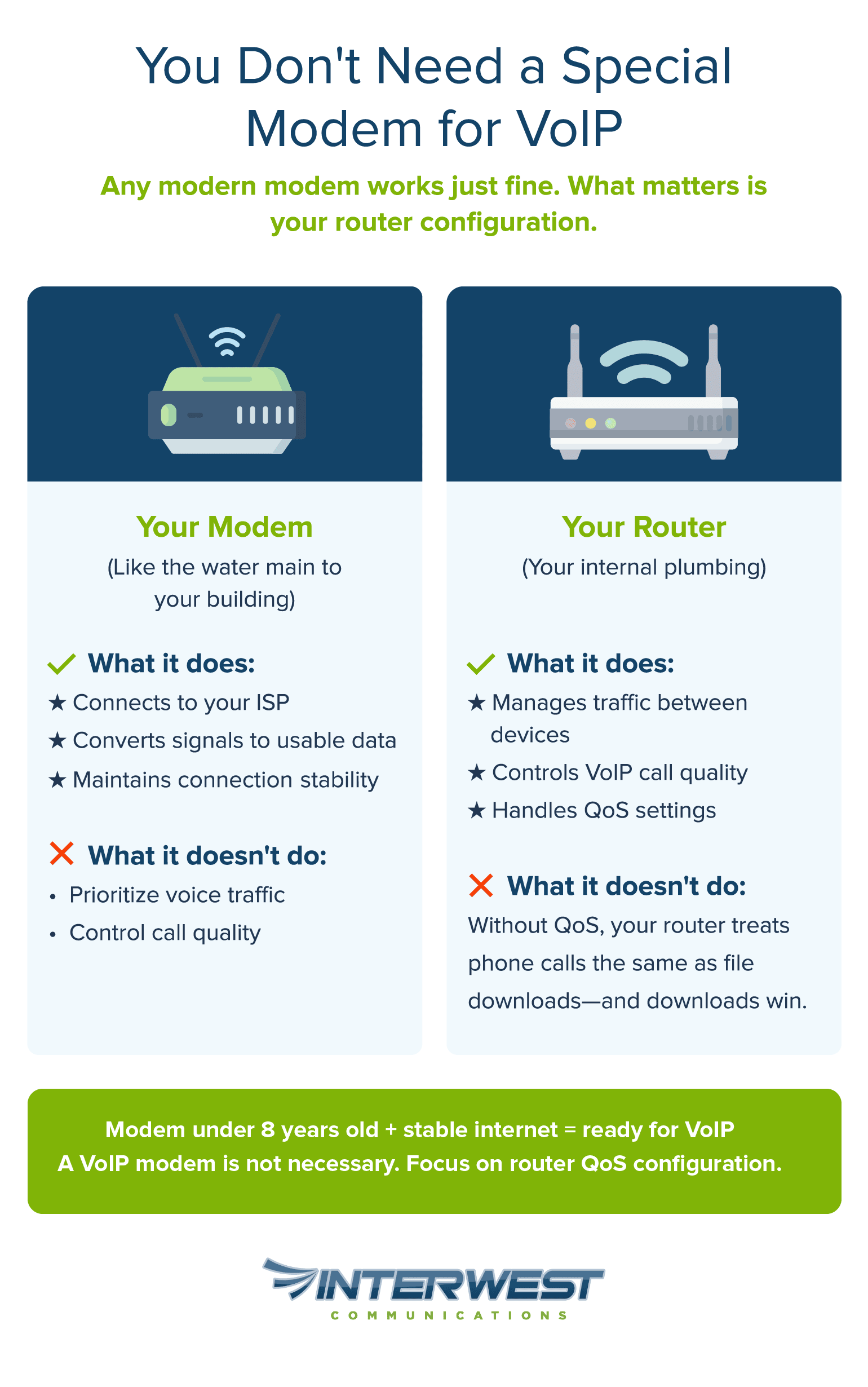
Your modem is like the water main to your building—it determines whether water reaches you at all. Your router is the internal plumbing—it determines whether the shower has decent pressure while someone else runs the dishwasher. VoIP quality depends far more on the plumbing than the main.
When businesses experience choppy audio, dropped calls, or awkward voice delays, the modem is almost never at fault. The actual causes: router configuration (specifically, missing QoS settings), network congestion from competing traffic, or underlying internet instability. All fixable without buying new hardware. Once you understand this distinction, VoIP modem requirements become much clearer.
For a complete picture of VoIP equipment needs, see our complete VoIP hardware guide.
 Understanding the Modem’s Role in VoIP
Making a smart decision about hardware starts with understanding what each device actually does, and what it doesn’t.
What Your Modem Actually Does (And Doesn’t Do)
Your modem is a translator. It converts the signal from your ISP—arriving via coaxial cable, phone line, or fiber—into data your network can use. That’s essentially its entire job: establish the connection, maintain it, convert signals in both directions.
What the modem handles: The physical link to your ISP, signal conversion, and connection stability.
What the modem doesn’t handle: Deciding which devices get priority, managing traffic between your computers and phones, configuring voice traffic rules, and anything happening inside your network after data arrives.
This distinction matters because VoIP problems almost always originate after data passes through the modem. The modem delivered the packets. What happens next falls to the router.
Three terms are worth knowing here:
- Bandwidth measures how much data your connection can move, in Mbps.
- Latency is the delay between speaking and being heard. The ITU-T G.114 standard recommends under 150 milliseconds for high-quality voice.
- Jitter is inconsistency in that delay, causing choppy or garbled audio. Industry standards recommend under 30ms for acceptable VoIP quality.
Here’s the key insight: VoIP cares far more about latency and jitter than raw bandwidth. A 10 Mbps connection with 30ms latency delivers better calls than 100 Mbps with 200ms latency. Since your modem doesn’t control latency or jitter—those depend on your ISP’s network and your router’s traffic management—upgrading your modem rarely fixes voice quality problems.
Modem vs. Router vs. Gateway: Clearing Up the Confusion
Networking terminology gets genuinely confusing, especially when devices combine functions. Here’s the breakdown:
| Device | What It Does | Affects VoIP Quality? |
| Modem | Connects to your ISP; translates external signals to usable data | Indirectly—unstable connection hurts everything |
| Router | Manages traffic between devices; assigns IP addresses; handles QoS | Directly—controls what gets priority |
| Gateway | Modem and router combined in one box | Both factors apply |
If your ISP provided your equipment, you probably have a gateway. This matters because the QoS settings you’d adjust live in the router portion of that device, not anything modem-specific.
For more on how VoIP phones physically connect, see our guide on how VoIP phones connect to your network.
Why “VoIP Modems” Are Mostly Marketing
Modems advertised as “VoIP-ready” or “optimized for voice” sound compelling. They’re not.
No industry certification makes a modem VoIP-specific. No technical standard. No special protocol. The term is marketing. What these products typically offer is compliance with DOCSIS 3.0—a standard any modem manufactured after 2010 already meets—or a built-in router with QoS pre-configured.
DOCSIS (Data Over Cable Service Interface Specification) governs how cable modems communicate with ISPs. Version 3.0 was released in August 2006 and supports speeds that dwarf VoIP requirements. The current DOCSIS 3.1 handles capacities up to 10 Gbit/s downstream—massive overkill for voice. For DSL connections, the equivalent standard is VDSL2, which similarly exceeds what VoIP needs by a wide margin.
The practical test: If your modem is under eight years old and your internet handles streaming video, video calls, and general browsing without constant issues, you have a capable modem for VoIP phone service. No special purchase necessary.
Evaluating Your Current Setup
Rather than guessing, you can assess your equipment systematically in a few minutes.
The 3-Minute Modem Checkup
Four steps to determine if your modem is VoIP-ready:
Step 1: Check the age. Find the manufacture date on your modem’s label (usually on the bottom or back). Under 8 years old? You’re likely fine. Over 10 years? It may use standards your ISP is phasing out.
Step 2: Verify the standard. Cable modems should support DOCSIS 3.0 or higher. DSL modems need VDSL2. Check the label, your documentation, or ask your ISP.
Step 3: Assess stability. Does your connection drop more than once or twice a month? Frequent disconnections point to modem issues or ISP problems. Stable connections—even modest ones—typically support VoIP well.
Step 4: Confirm upload speed. Run a speed test during business hours. VoIP needs roughly 100 Kbps upload per simultaneous call. With 10 Mbps upload, you could run 50 concurrent calls with room to spare. Most business plans exceed this easily.
Pass all four? Your modem isn’t your limiting factor.
Testing Your Network for VoIP Readiness
Beyond the modem, overall network health shapes call quality.
Test during peak hours. Measuring at 2 AM tells you nothing useful. Test when your office is busiest—that’s when congestion affects calls.
Watch these metrics:
- Download speed: 10+ Mbps handles most small businesses comfortably.
- Upload speed: More critical for VoIP; 5+ Mbps covers typical use.
- Latency (ping): Under 150ms is functional; under 50ms feels seamless.
- Jitter: Under 30ms prevents choppiness; under 15ms is excellent.
Run tests 3-4 times throughout a business day for a realistic picture.
Reading the results: Adequate speeds but high latency or jitter? The issue likely sits between your ISP and the broader internet, not your modem. Speeds dropping during peak hours? That points to local network congestion (router territory) or a conversation with your ISP about service tiers.
When the Problem Isn’t Your Modem
- Router configuration leads the list. Without QoS enabled, your router treats a phone call identically to a large file download—and the download demands more bandwidth, so it wins. QoS tells the router that voice packets matter more.
- Network congestion comes next. Too many devices fighting for bandwidth at once. This spikes when employees stream video, run backups, or download updates during work hours.
- WiFi interference undermines reliability. VoIP phones on wireless connections contend with neighboring networks, walls, and competing devices. Wired phones don’t have this problem.
- ISP service issues sometimes masquerade as local equipment problems. Line noise, routing hiccups, or throttling at the provider level can degrade calls in ways no local fix addresses.
When internet connectivity itself fails, that’s a different challenge. See our guide on VoIP and internet outages.
When You Might Actually Need New Hardware
Most businesses don’t need equipment upgrades for VoIP. But some scenarios genuinely warrant them.
Signs Your Modem Needs Replacement
Consider a new modem if:
- It predates 2015. Modems that old may run DOCSIS 2.0 or earlier—standards ISPs are retiring. Older standards also carry inherently higher latency.
- Your ISP dropped support for it. Providers periodically retire equipment from their compatible lists. Unsupported devices may see degraded service or connection problems.
- Disconnections happen weekly. If your internet drops multiple times per week and your ISP has cleared line issues, the modem hardware itself may be failing.
- Physical damage is visible. Power surges, water exposure, or heat damage can cause intermittent failures that are hard to diagnose.
Even when replacement makes sense, skip the “VoIP modem” branding. Any current-generation modem compatible with your ISP works fine. Prioritize reliability ratings and ISP compatibility over voice-specific marketing.
The Case for Upgrading Your Router Instead
Here’s a common pattern: A business owner believes they need a new modem because of call quality issues. Assessment reveals a perfectly functional modem—paired with a consumer router from 2015 that lacks QoS and struggles with a growing device count.
QoS (Quality of Service) prioritizes traffic types. Properly configured, it ensures voice packets—small but time-sensitive—transmit ahead of bulk downloads—large but delay-tolerant. Without QoS, your phone call competes equally with every file transfer and software update on your network.
Signs pointing to router rather than modem:
- Call quality tanks when others actively use the network.
- You can’t locate QoS settings in your router’s interface.
- The router needs regular reboots to stay stable.
- You’ve added many devices since purchasing it.
Business-grade routers with solid QoS typically run $150-400, often less than unnecessary modem swaps and ongoing ISP equipment rental combined.
VoIP Adapters (ATAs): An Alternative to Hardware Overhaul
Businesses wanting to keep existing analog phones have another option: an ATA (Analog Telephone Adapter).
ATAs connect traditional phones to VoIP service by converting analog voice signals to digital packets. This preserves investments in existing hardware—useful if you have specialized conference phones, fax machines, or accessibility equipment.
One clarification: ATAs don’t replace modems or routers. They’re an addition connecting to your existing network. Modem and router requirements stay the same whether you use IP phones or ATAs.
For the full picture on hardware options, see our VoIP hardware requirements guide.
Optimizing What You Already Have
Before buying anything, these adjustments often resolve VoIP issues with your current equipment.
Router Settings That Improve VoIP Quality
Three changes tend to deliver the biggest impact:
- Enable and configure QoS. Access your router’s admin interface (typically 192.168.1.1 or 192.168.0.1 in a browser). Look for QoS, Traffic Management, or Bandwidth Control. Prioritize SIP and RTP traffic—the protocols VoIP uses. SIP (Session Initiation Protocol) sets up and tears down calls. RTP (Real-time Transport Protocol) carries the voice itself. Most routers let you prioritize by port number (SIP typically uses port 5060; RTP uses a range like 10000-20000) or by device IP address.
- Wire your VoIP phones when possible. Ethernet eliminates WiFi variability entirely. If running cables isn’t practical everywhere, at minimum wire your primary business lines.
- Consider VLAN segmentation. Placing voice on its own VLAN (Virtual Local Area Network) isolates it from other traffic completely. This requires a managed switch and VLAN-capable router, but it’s increasingly accessible for small businesses. The payoff: Voice traffic operates as if it has a dedicated network path.
Working with Your ISP
Your ISP can help optimize VoIP if you ask the right questions.
“Is my modem on your current supported list?” — Confirms your equipment is recognized and functioning optimally with their network.
“Can you test for line issues affecting latency or packet loss?” — ISPs run diagnostics revealing problems invisible from your side such as last-mile degradation, node congestion, and facility equipment issues.
“What business-grade tiers do you offer?” — Commercial service often includes latency guarantees, static IPs, and priority support. Better VoIP performance comes not from speed increases but from quality-of-service commitments.
Using ISP-provided equipment (a gateway)? They typically handle firmware updates and can sometimes adjust settings remotely. Convenient for maintenance, though it may limit your QoS customization.
For power outage concerns—related but distinct from connectivity—see our guide on keeping VoIP working during outages.
Making the Right Decision for Your Business
With all this context, here’s a straightforward decision framework:
- Internet stable + modem under 8 years old → No modem upgrade needed. Configure router QoS.
- Internet unstable + modem over 8 years old → Consider modem replacement. Any modern DOCSIS 3.0+ or VDSL2 unit works.
- Call quality degrades during heavy network use → Router upgrade or QoS configuration—not modem replacement.
- Want to keep existing analog phones → Add an ATA adapter. Modem requirements unchanged.
- Router lacks QoS or is over 5 years old → Router upgrade delivers better ROI than modem replacement for voice quality.
“Special VoIP modems” are marketing, not a technical category. Call quality hinges on router configuration and network management. Most businesses achieve excellent VoIP with their existing modem and when upgrades help, router improvements typically outweigh modem replacement.
The single most valuable step you can take today costs nothing: Log into your router, find the QoS settings, and prioritize voice traffic. This one change resolves the majority of VoIP quality complaints.
Want expert confirmation before making changes? Our team can evaluate your network in minutes. Get in touch.