
- March 12, 2026
- Posted by: Interwest Communications Team
- Category: News


Can a VoIP Phone Be Used as a Regular Phone?
Yes, you can use a VoIP phone as a regular phone — the only difference is what happens behind the scenes: instead of sending your voice over copper wires, VoIP converts it into digital data and routes it over your internet connection. What changes is everything you don’t see — cost, flexibility, and what your phone system can actually do for your business.
Key Takeaways
- VoIP works just like a regular phone. You get a dial tone, make and receive calls, use voicemail, caller ID, call forwarding, hold, transfer, and 911 — all with the same experience as a traditional landline.
- VoIP Call quality meets or exceeds landline standards. VoIP systems using wideband codecs deliver HD Voice across a fuller frequency range than copper lines can carry.
- You may not need new equipment. An analog telephone adapter (ATA) lets you plug existing phones into a VoIP system. Dedicated IP desk phones and softphone apps offer additional options.
- Emergency calling (E911) is fully supported. Federal regulations under Kari’s Law and RAY BAUM’s Act require VoIP systems to support direct 911 dialing and accurate location information.
- Internet dependency is manageable. Automatic call forwarding, cellular failover routers, and provider-configured backup rules keep your phones reachable during outages.
- Number porting is federally protected. You keep your existing business phone numbers when you switch — your clients never know the difference.
- Cost savings are significant. Businesses typically see 30–50% reductions in total communications spending after migrating from traditional phone systems.
- The PSTN is being retired. The FCC has authorized carriers to accelerate copper network retirement, making proactive migration the smarter path.
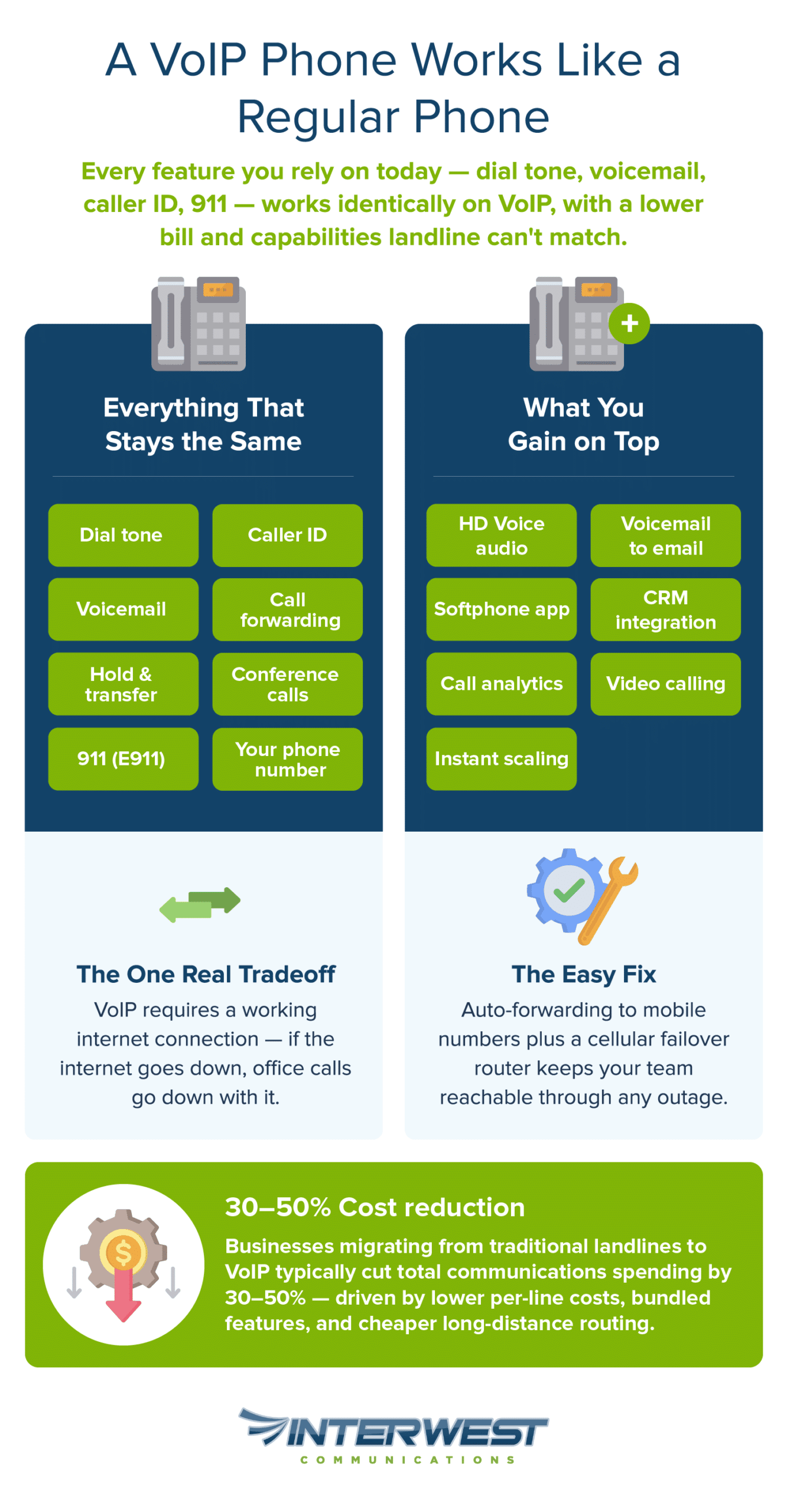
How VoIP Phones Work Compared to Traditional Phones
What Makes VoIP Different from a Landline
A traditional landline converts your voice into electrical signals and carries them over copper wires through the Public Switched Telephone Network (PSTN) — the same infrastructure that’s been connecting phone calls since the mid-20th century. VoIP (Voice over Internet Protocol) does the same job differently: it converts your voice into digital data packets and transmits them over your existing internet connection.
Think of it as the difference between mailing a letter and sending an email. The message is identical — the delivery method is faster and cheaper. Behind the scenes, your voice is digitized using a codec — short for coder-decoder, a compression algorithm that’s been standard in telecommunications for decades. That digitized voice is broken into small packets, sent across the internet, and reassembled at the other end in real time. The whole process takes milliseconds. The person on the other end hears you as naturally as on any phone call.
What most people don’t realize: carrier backbone networks have largely transitioned to IP-based infrastructure. Major carriers have been routing calls through digital networks for years. In many cases, the copper wire to your building is just the last mile of a journey that’s already digital. VoIP simply removes that last analog leg entirely.
The protocol orchestrating all of this is called SIP — Session Initiation Protocol, defined in IETF RFC 3261 — which manages call setup, routing, and teardown behind the scenes, much like the signaling protocols on your current landline handle tasks you’ve never had to think about.
| Feature | Traditional Landline | VoIP Phone |
| Voice Transmission | Copper wire / PSTN | Internet (data packets) |
| Phone Number | Yes — standard 10-digit | Yes — standard 10-digit (number porting available) |
| Call Quality | Consistent (dedicated line) | Excellent with stable broadband (HD voice capable) |
| Voicemail | Yes | Yes — plus voicemail-to-email |
| Caller ID | Yes | Yes |
| Call Forwarding | Yes (may cost extra) | Yes (typically included) |
| Conference Calling | Limited | Built-in, multi-party |
| Remote Access | No — tied to physical location | Yes — any device, anywhere |
| Monthly Cost per Line | Higher (dedicated infrastructure) | Lower (shared internet infrastructure) |
| Scalability | Requires new physical lines | Add lines instantly via software |
| Video Calling | No | Yes |
| CRM Integration | No | Yes |
| Requires Internet | No | Yes |
| Works During Power Outage | Yes (line-powered) | Requires backup — see our guide |
How VoIP Phones Replicate Every “Regular Phone” Feature
If you walked into an office running VoIP and picked up a desk phone, you wouldn’t know the difference. This is what the daily experience actually looks like:
- Making and receiving calls works exactly the way you’d expect. Dial a number, the call connects, the other party’s phone rings. Incoming calls ring your handset (or your computer, or your mobile app — but more on that later). There’s no special procedure, no app to open, no extra steps. Pick up the phone and talk.
- Voicemail operates the same way, with one notable improvement: most VoIP systems include voicemail-to-email transcription, so messages arrive in your inbox as audio files with text summaries. You can review a voicemail between meetings without dialing in to check a mailbox.
- Caller ID is standard on every VoIP system, as are call forwarding and transfer — though VoIP typically makes these more flexible than their landline equivalents. Forwarding rules can be set by time of day, by caller, or by availability, and transfers happen with a button press whether the recipient is in the next office or across the country.
- Hold and hold music — standard. Conference calling — built in, typically supporting far more participants than a landline bridge.
- Emergency calling (911) is a legitimate concern and worth addressing directly. VoIP supports Enhanced 911 (E911), which transmits your registered business address to emergency dispatchers when you call. Federal regulations have caught up here — the FCC’s implementation of Kari’s Law and RAY BAUM’s Act now requires multi-line phone systems, including VoIP, to support direct 911 dialing without an outside line prefix and to provide accurate dispatchable location information. Your one responsibility: keep your registered address current with your VoIP provider. Office moves? Update the address. That’s it.
One area where VoIP actually surpasses landlines is audio quality. Traditional phone lines squeeze your voice through a narrow frequency range — roughly 300 to 3,400 Hz — which is why landline calls have that characteristic slightly muffled quality. VoIP systems using wideband codecs like G.722 capture a much fuller range (up to 7,000 Hz), delivering what the industry calls HD Voice. The difference is immediately noticeable: calls sound richer, clearer, and more natural than what copper lines can deliver.
And if you’re wondering whether you need to replace all your existing phones to make the switch — in many cases, you don’t.
Using Your Existing Equipment with VoIP
Analog Telephone Adapters (ATAs): Keep Your Current Phones
An analog telephone adapter — or ATA — is a small device that connects your existing analog phones to a VoIP system. It plugs into your internet router or network switch and provides a standard phone port (technically called an FXS port, for Foreign Exchange Subscriber — it’s just the standard phone jack) for your current handset.
Setup is straightforward:
-
- Plug the ATA into your router or network switch via Ethernet cable.
- Connect your existing analog phone to the ATA’s phone port.
- The ATA handles the conversion between your phone’s analog voice signals and the digital VoIP data.
- Pick up the handset — you get a dial tone, and your phone works exactly as before.
But the real value of an ATA goes beyond convenience: it’s a zero-risk way to test VoIP before committing to anything. Many businesses start by running two or three lines through an ATA alongside their existing landline service. They compare the experience directly — same office, same phones, same callers — and decide based on firsthand evidence rather than speculation. It’s a pilot program that costs almost nothing to run.
For a deeper look at which existing phones are compatible, see our guide: Will My Old Phone Work on VoIP?
Dedicated VoIP Desk Phones and Softphones
Beyond ATAs, two other hardware paths unlock VoIP’s full feature set:
Dedicated VoIP desk phones (IP phones) are purpose-built handsets that connect directly to your network via Ethernet. They look and feel like traditional desk phones — familiar handset, keypad, speakerphone — but they run VoIP natively. Many include HD displays, programmable function buttons, and built-in conferencing capabilities. For businesses that want a premium desk phone experience, these are the upgrade path.
Softphones are software applications that turn any computer, tablet, or smartphone into a fully functional business phone. You install the app, log in with your credentials, and your device can make and receive calls on your business number. For remote workers and hybrid teams, softphones are transformative — an employee working from home answers a client call on their laptop, and the caller sees the business number on their caller ID, not the employee’s personal cell. The experience is seamless for both parties.
Think of the equipment options as a spectrum: ATAs let you keep what you have, IP desk phones give you the premium experience, and softphones give you total mobility. Most businesses end up using a combination based on each employee’s role and work style.
For a comprehensive hardware breakdown, see: What Hardware Do You Need for VoIP?
Hybrid Systems: Running VoIP and Landlines Together
You don’t have to make an all-or-nothing decision. Hybrid systems allow businesses to run VoIP alongside existing landlines during a transition period — or permanently, if certain use cases warrant it.
SIP trunking serves as the bridge technology here. If you have an existing PBX (Private Branch Exchange) phone system, SIP trunks replace the traditional copper phone lines feeding into it with internet-based connections. Your PBX hardware stays, your extensions stay, your internal routing stays — but the lines carrying calls in and out of your building switch from PSTN to internet. It’s a common first step for businesses with substantial existing PBX infrastructure that isn’t ready for full retirement.
A phased migration typically looks like this: start with VoIP on a few lines or a single department, run it alongside the legacy system for a period, confirm it meets your expectations, then expand. Some businesses maintain landlines permanently for specific functions — elevator emergency phones, security alarm dialers, fax machines — while moving all general office communication to VoIP.
Switching to VoIP doesn’t require ripping everything out on a Friday and hoping it works on Monday. A controlled, gradual transition is not only possible — it’s usually recommended.
Once you’ve decided on your equipment approach, getting VoIP up and running is more straightforward than most business owners expect.
Setting Up a VoIP Phone to Work Like a Regular Phone
What You Need to Get Started
Most businesses already have the majority of what they need. The short list:
- A broadband internet connection. A single voice call using the standard G.711 codec requires roughly 85 to 100 Kbps of bandwidth in each direction. To put that in perspective, a standard 100 Mbps business internet connection can comfortably handle hundreds of simultaneous calls. If your office can stream video, send emails, and run cloud applications without issues, your internet can handle VoIP.
- A router or network switch with QoS capability. QoS stands for Quality of Service — it’s a router setting that gives voice traffic priority over other types of internet activity like file downloads or web browsing. When multiple people in your office are using the internet simultaneously, QoS ensures voice packets get through first, preventing choppy audio or dropped words. Most business-grade routers support this out of the box.
- VoIP hardware. ATAs for your existing phones, dedicated IP desk phones, softphones, or a combination — covered in detail above.
- A VoIP service provider. This is the piece that ties everything together. Your provider handles call routing, number provisioning and porting, E911 registration, system configuration, and ongoing support. The quality of your provider directly determines the quality of your experience — which is why choosing a professional provider who has direct implementation expertise matters more than most businesses realize at the outset.
Optimizing Call Quality and Reliability
On a properly configured network, VoIP call quality meets or exceeds traditional landline quality — and with HD Voice codecs, it often sounds noticeably better. A few practical steps keep it consistently reliable:
- Enable QoS on your router. This is often the single most impactful step you can take. QoS prioritizes voice packets so a large file download in the next office doesn’t cause a momentary stutter on your call. ITU-T Recommendation G.114 recommends one-way voice latency stay under 150 milliseconds for natural conversation — QoS settings help ensure you stay well within that threshold.
- Use wired Ethernet connections for desk phones where possible. Wi-Fi works for VoIP — softphones prove that every day — but a wired connection eliminates wireless interference, signal drops, and the occasional latency spike that Wi-Fi can introduce. For fixed desk phones, wired is always the more reliable choice.
- Ensure adequate bandwidth headroom. If your team runs bandwidth-heavy applications alongside voice — large file transfers, video conferencing, cloud backups — make sure your internet plan provides comfortable capacity for everything running simultaneously. Your provider can help assess this.
- Choose a provider with reliability guarantees. Look for uptime service level agreements and redundant infrastructure. A provider with geographically distributed servers and automatic failover ensures your phone system stays up even if one data center experiences issues.
Not sure if your current network can handle VoIP? Our team can assess your setup and recommend the right configuration — get a free consultation.
With the right setup, VoIP doesn’t just match a traditional phone — it outperforms it in several critical ways.
Why Businesses Are Switching: VoIP Advantages Over Traditional Phones
Cost Savings That Add Up
The financial case for VoIP is structural, not gimmicky. Every traditional phone line running to your building requires dedicated copper infrastructure, per-line charges that scale linearly with headcount, and maintenance contracts for hardware that’s getting harder to service. VoIP eliminates most of that cost structure because voice traffic rides on the internet connection you’re already paying for.
The savings extend beyond the monthly bill. Long-distance and international calls cost substantially less over VoIP because they bypass traditional toll-charge routing entirely. Features that landline carriers typically charge extra for — voicemail, conferencing, auto-attendant, call forwarding — are generally bundled into standard VoIP service. Hardware maintenance drops because there are no copper lines to service and no legacy PBX to keep running.
Industry data consistently reports that businesses migrating from traditional phone systems to VoIP see meaningful reductions in total communications spending, with savings typically in the range of 30 to 50 percent depending on company size, call volume, and the legacy system being replaced.
For a detailed cost comparison, see: Is VoIP Cheaper Than a Landline?
Flexibility and Mobility for Modern Teams
This is where VoIP fundamentally outpaces traditional phones. A cloud phone system means your business number isn’t tethered to a physical copper line in a specific building — it lives in the cloud and can ring on any device, anywhere.
Picture it: an employee working from home answers a client call on their laptop softphone. A sales rep in an airport takes the same kind of call on their mobile app. In both cases, the caller sees the business number on their caller ID — not a personal cell. The physical location of the person answering is invisible to everyone on the other end of the line.
Number porting — transferring your existing business phone numbers to a VoIP system — is not only possible but federally protected. Under Section 251 of the Telecommunications Act, carriers are legally required to allow you to port your numbers. Your business number belongs to you, not your phone company. When you switch to VoIP, your clients and vendors never know the difference.
For multi-location businesses, hosted VoIP eliminates the need for separate phone systems in every office. All locations connect through a single cloud-based platform, with unified directories, extension dialing between offices, and centralized management.
Advanced Features That Landlines Can’t Match
Beyond matching traditional phone functionality, VoIP unlocks capabilities that simply aren’t possible on legacy infrastructure.
An auto-attendant routes callers to the right department without a human operator. Call analytics reveal volume patterns, average hold times, and peak usage — data that helps you staff more intelligently. CRM integration logs calls automatically and surfaces customer records the moment the phone rings. Video conferencing lives on the same platform as your voice calls. Voicemail arrives transcribed in your inbox. Call recording supports training, compliance, and dispute resolution. And when you need to scale, adding or removing lines takes minutes through a software dashboard — no technician visit, no new wiring.
These aren’t hypothetical future features. They’re standard capabilities that businesses gain on day one of a VoIP deployment.
Of course, no technology is without considerations. VoIP has a few limitations worth understanding — along with straightforward ways to handle them.
Addressing Common Concerns About Using VoIP as Your Primary Phone
Internet Dependency
This is the most straightforward concern, so let’s address it directly: VoIP requires a working internet connection. No internet means no VoIP calls. That’s a real dependency.
But step back and consider what your business day already looks like. If your internet goes down right now, you also lose email, credit card processing, cloud applications, and likely the ability to do meaningful work at all. Your business is already built on internet connectivity. VoIP adds virtually no incremental risk to a dependency you’re already operating within.
That said, mitigations exist and are easy to implement. Automatic call forwarding to mobile numbers during outages means calls reach your team regardless. Cellular failover routers — devices that automatically switch to a 4G or 5G backup connection when your primary internet drops — keep everything running through brief outages. And your VoIP provider can configure failover rules that redirect calls to backup numbers or voicemail the instant connectivity drops.
For more detail: Will VoIP Work if the Internet Is Down?
Power Outage Considerations
Traditional landlines have one genuine advantage: they’re powered directly through the phone line itself — 48 volts DC from the telephone company’s central office — so they work even when your building loses power. VoIP equipment — your router, switches, and IP phones — requires electricity.
The mitigations are practical and well-established. A UPS (Uninterruptible Power Supply) battery backup on your router and core network equipment keeps VoIP running through short outages, typically 30 minutes to several hours depending on the unit. PoE (Power over Ethernet) switches centralize power management for desk phones. And if the office truly goes dark, softphone apps on mobile devices — running on cellular data — keep your team reachable with full business phone functionality. Most providers can configure automatic failover to mobile devices the moment office equipment goes offline.
For a deeper dive: Do VoIP Phones Work During a Power Outage?
Emergency Calling (E911)
VoIP supports Enhanced 911 (E911), which transmits your registered business address to emergency dispatchers when someone dials 911. FCC regulations mandate that all interconnected VoIP providers offer E911 service, and recent federal requirements under Kari’s Law ensure that 911 calls go through directly from any phone on the system without needing to dial an outside line prefix.
Your one responsibility: keep your registered address current. If your business moves locations, update the E911 address with your provider immediately. This takes minutes and ensures dispatchers receive accurate location information. Beyond that, your provider handles the regulatory compliance.
When you add it all up, VoIP doesn’t just work as a regular phone — for most businesses, it’s the better phone.
VoIP Is a Regular Phone — and Then Some
Can you use a VoIP phone as a regular phone? In every way that matters to your business, yes — and the better question at this point is why you’d keep paying for a traditional system that does less.
VoIP replicates every standard phone feature — calling, voicemail, caller ID, forwarding, hold, transfer, and emergency services — with an experience that’s indistinguishable from the landline on your desk today. You can keep your existing phones using an ATA, upgrade to dedicated IP desk phones, or go fully mobile with softphones. Hybrid systems let you transition at whatever pace makes your business comfortable.
The few real limitations — internet dependency and power requirements — have practical, proven mitigations that most businesses can implement in an afternoon. And the advantages that VoIP delivers beyond basic phone functionality — cost savings, mobility, advanced features, instant scalability — represent a meaningful operational upgrade that legacy phone systems simply cannot match.
One final consideration: copper PSTN infrastructure is being actively retired. The FCC issued orders in March 2025 streamlining the process for carriers to discontinue legacy copper networks, with further rulemaking advancing through mid-2025 to make those changes permanent. Businesses that transition to VoIP now choose their own timeline, with room to plan and optimize. Those that wait may face a forced migration with less flexibility.
Ready to see how VoIP can work for your business? Interwest Communications specializes in seamless transitions from traditional phone systems to modern VoIP — with expert setup, ongoing support, and the reliability your business depends on. Contact us for a free consultation.