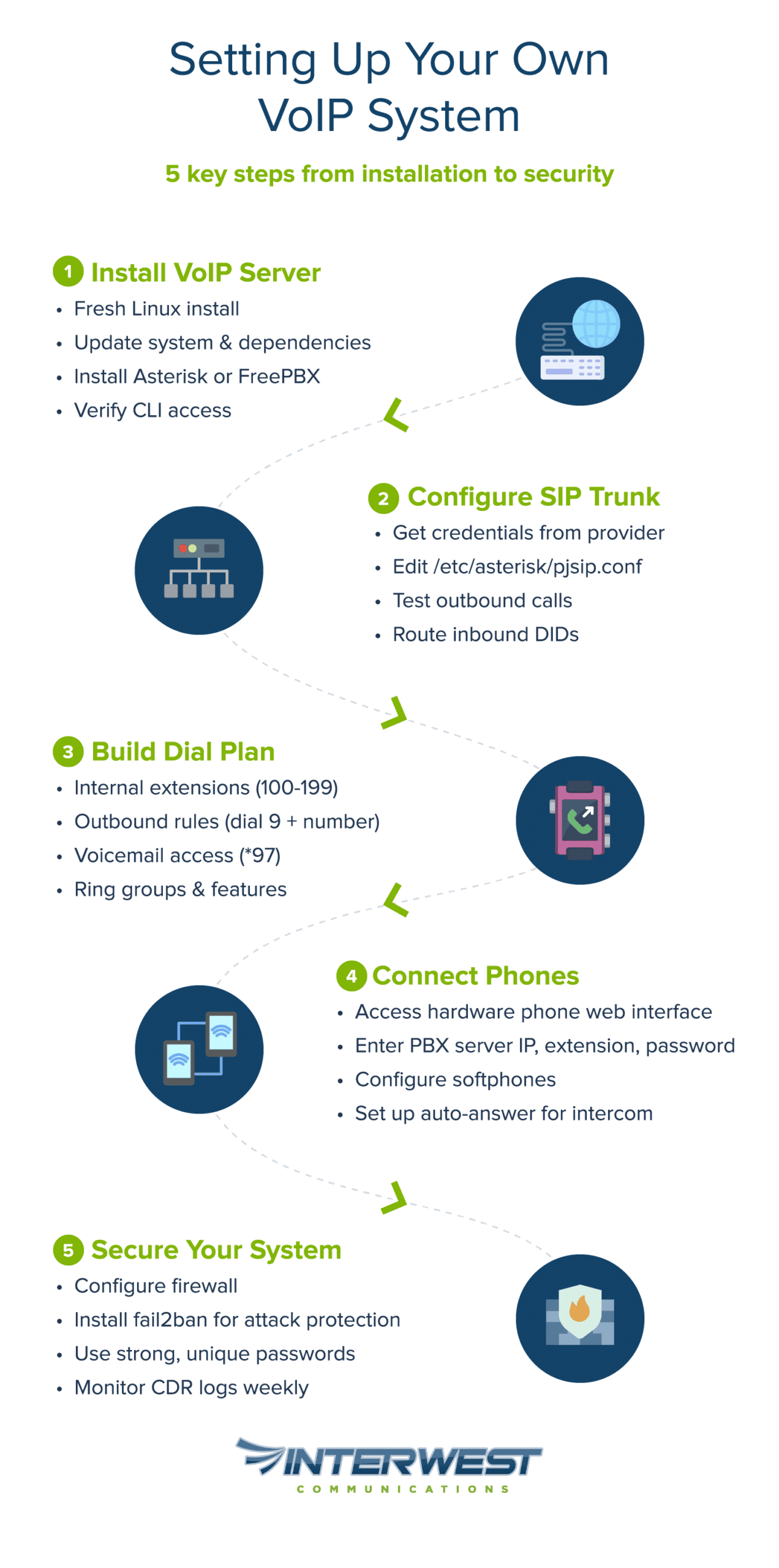
Yes, you can set up your own VoIP system if you have intermediate Linux skills, a stable internet connection, and realistic time expectations for initial configuration. Open-source platforms like Asterisk let you build a fully functional phone system with custom call routing, voicemail, and extensions, all without monthly per-user fees. The trade-off: you become your own IT support. This guide walks you through everything from hardware requirements to security hardening, so you can decide whether a DIY VoIP phone system fits your situation, or whether professional support is the smarter path.
Key Takeaways
Yes, you can build your own VoIP system — Asterisk and FreePBX provide mature, well-documented platforms that power everything from home labs to enterprise deployments.
Technical prerequisites are non-negotiable — Linux command-line comfort, basic networking knowledge, and troubleshooting patience separate success from frustration.
Security is foundational, not optional — SIP honeypot research shows unsecured servers receive hundreds of thousands of attack attempts within 24 hours.¹ A compromised PBX can generate thousands of dollars in fraudulent charges overnight.³
Bandwidth requirements are modest — G.711 codec uses approximately 87 Kbps per call with Ethernet overhead;⁶ most home internet connections handle multiple simultaneous calls easily.
The real cost is your time — Hardware investment is one-time, but ongoing maintenance (security updates, troubleshooting, backup verification) is a permanent responsibility.
Know when to get help — If downtime directly costs you money or you lack Linux experience and don’t want to learn, managed VoIP service delivers reliability without the overhead.
The Short Answer (and What It Really Takes)
Yes, you can build your own VoIP system. But “can” and “should” are different questions.
Self-hosted VoIP gives you complete control over your phone infrastructure. You own the hardware, you set the rules, and you escape the per-seat subscription treadmill. For the right person, it’s deeply satisfying — like running your own mail server, but with more immediate practical value.
Here’s the honest part: you’re signing up to be your own telecom department. When calls drop at 2 AM on a Sunday, there’s no support line to call. That’s either exhilarating or exhausting depending on your temperament.
Reality Check: Is DIY VoIP Right for You?
Requirement
What It Means
Linux CLI comfort
You’ll edit configuration files, restart services, and read logs. If sudo nano /etc/asterisk/pjsip.conf looks foreign, budget extra learning time.
Basic networking knowledge
IP addresses, subnets, port forwarding, firewall rules. You don’t need a CCNA, but you should know what “port 5060” means.⁷
Troubleshooting patience
Something will break. Probably NAT-related. Documentation-reading skills matter more than prior VoIP experience.
Time investment
Initial setup time varies significantly based on experience and system complexity. Expect ongoing commitment of a few hours monthly.
Cost structure
One-time hardware investment plus recurring SIP trunk fees — typically pay-per-minute or a low monthly flat rate for external calling.
Best fit: You already run a homelab, you’re privacy-conscious about communications, or your small business wants to eliminate per-seat licensing.
Consider managed service instead: Downtime directly costs you money, you lack Linux experience and don’t want to learn, or you need guaranteed uptime with SLA backing.
Not sure which camp you’re in? Talk to our team for a no-pressure consultation.
This guide covers fundamentals, walks through setup step-by-step, and addresses the security requirements that too many tutorials skip.
Self-Hosted VoIP Fundamentals You Need to Know
Before touching any configuration files, build a mental model of how the pieces fit together.
How VoIP Turns Voice Into Data
When you speak into a VoIP phone, your voice converts to digital data, gets chopped into small packets, and travels across the internet. The receiving end reassembles those packets back into audio. Think of it like sending a voice note, but in real-time. This conversion happens fast enough that delay is imperceptible when everything works correctly.
Three terms you’ll encounter constantly:
Codec — The algorithm compressing your voice into digital data. G.711 offers excellent quality but uses more bandwidth (approximately 87 Kbps per call including Ethernet overhead).⁶ G.729 compresses more aggressively at around 31 Kbps;⁶ while historically requiring licensing fees, patents expired in 2017 making it royalty-free. Opus is newer, open-source, and adapts dynamically to network conditions, scaling from 6 Kbps to 510 Kbps depending on content and bandwidth.⁹
Latency — The delay between speaking and being heard. ITU-T G.114 specifications recommend one-way delay under 150 milliseconds for natural conversation; above 300 milliseconds creates awkward overlap.⁶ Latency depends on your internet connection, geographic distance, and network congestion.
Jitter — Variation in packet arrival times. Even if average latency is low, inconsistent timing causes choppy audio. Quality VoIP setups use jitter buffers to smooth out the inconsistency.
Key Components of a Self-Hosted System
Your self-hosted VoIP system has several interconnected parts:
PBX (Private Branch Exchange) — The brain of your phone system. It routes calls, manages extensions, handles voicemail, and executes your dial plan rules. Asterisk is the open-source PBX software you’ll likely use.
SIP (Session Initiation Protocol) — The language phones and servers speak to communicate. SIP handles call setup, teardown, and feature negotiation. When your phone “registers” with the server, it’s speaking SIP. The default SIP port is 5060 for UDP, TCP, and SCTP, as defined in RFC 3261.⁷
SIP Trunk — Your connection to the outside world. A SIP trunk provider bridges your private system to the public telephone network (PSTN), giving you real phone numbers that can call and receive calls from regular phones.
Softphone — Software that turns your computer or smartphone into a VoIP phone. Useful for remote work and testing.
Hardphone — A dedicated VoIP desk phone. Looks like a traditional phone but connects via Ethernet and speaks SIP natively.
Now that you understand the pieces, let’s assess whether your network can support them. For more on physical connections, see how VoIP phones connect to your network.
Assessing Your Readiness (Before You Buy Anything)
Hardware purchases should come after honest self-assessment. The most expensive equipment won’t compensate for missing prerequisites.
Skills Audit — What You Need to Know
Before proceeding, confirm you can check these boxes:
Comfortable navigating the Linux command line
Understand basic networking (IP addresses, subnets, port forwarding)
Willing to read documentation and troubleshoot independently
Have adequate time available for initial setup and ongoing learning
If you checked all four, you’re ready. If not, consider whether learning these skills is part of your goal, or whether managed service is the more honest choice for your situation.
Network and Hardware Requirements
Network Prerequisites:
Your internet connection needs to reliably handle real-time audio. The requirements aren’t extreme, but they’re non-negotiable.
Bandwidth: Plan for approximately 100 Kbps per concurrent call. G.711 codec uses approximately 87 Kbps including Ethernet overhead,⁶ so for a small office with 5 simultaneous calls, budget at least 500 Kbps dedicated to voice. One Mbps or more provides comfortable headroom.
Latency: ITU-T G.114 recommends one-way delay under 150 milliseconds.⁶ Test with ping — consistent results matter more than occasional spikes.
Quality of Service (QoS): Your router should prioritize voice traffic over bulk downloads. Without QoS, a large file transfer can destroy call quality.
Wired connections strongly recommended: WiFi adds latency variability. For desk phones and your home VoIP server, Ethernet provides consistent performance. Learn more about whether VoIP needs to be hardwired for home offices.
Hardware Options (Tiered by Scale):
Scale
Hardware
Notes
Minimal (1–5 extensions)
Raspberry Pi 4
Adequate for home or micro-office. Research confirms Raspberry Pi platforms can handle IP PBX workloads for small deployments.⁸
Recommended (5–20 extensions)
Dedicated mini-PC or VM
Two or more cores and 2GB+ RAM provides headroom for growth.
Scalable (20+ extensions)
Server-grade hardware
When you’re running a real business phone system, invest accordingly.
Choosing Your VoIP Platform and SIP Trunk Provider
With prerequisites confirmed, you’re ready for platform and provider decisions.
VoIP Software Options — Open Source vs. Commercial
For self-hosted VoIP, Asterisk is the industry standard. It’s open-source, extensively documented, and has been downloaded over 25 million times — powering everything from home labs to enterprise call centers. The Asterisk VoIP setup learning curve is real, but community support is unmatched.
If command-line configuration feels intimidating, FreePBX adds a web-based graphical interface on top of Asterisk — it’s a GUI that controls and manages Asterisk. Same underlying power, more approachable administration. FreePBX’s module system also simplifies common tasks like adding extensions or configuring voicemail. The FreePBX Distro provides an all-in-one ISO bundling Linux, Asterisk, and FreePBX together.
Both are free to use. Your choice depends on whether you prefer configuration files or web interfaces — and how deeply you want to understand what’s happening under the hood.
Selecting a SIP Trunk Provider
Your SIP trunk provider bridges your private PBX to the public phone network. They assign you real phone numbers and handle routing to traditional telephone infrastructure.
Evaluation criteria when comparing providers:
Pricing model: Per-minute billing works well during testing and for low-volume usage. Unlimited plans make sense once you’ve validated the system and know your call volume.
Codec support: Confirm they support your preferred codecs. G.711 is a required standard in many VoIP technologies; G.729 and Opus support varies.
E911 compliance: For business or primary residence use, federal regulations require interconnected VoIP providers to supply E911 service as a condition of providing service to consumers.¹¹
Number porting: Can you bring your existing phone number? What’s the process and timeline?
Technical support: When your trunk stops registering at 10 PM, can you reach someone who understands SIP?
Geographic coverage: International calling rates vary dramatically between providers.
Practical recommendation: Start with pay-per-minute billing while testing. Once stable and you understand actual usage patterns, evaluate whether unlimited plans make financial sense.
With platform chosen and SIP trunk selected, you’re ready to build.
Step-by-Step VoIP Server Setup Guide
This section assumes a Debian or Ubuntu Linux base — the most common choice for Asterisk deployments.
Installing Your VoIP Server
High-level installation steps:
Provision a clean Linux installation. Start fresh. Minimal Debian or Ubuntu Server gives you a clean slate without unnecessary services competing for resources.
Update system and install dependencies. Before installing Asterisk, bring your system current and install required build tools and libraries.
Download and compile Asterisk (or use package manager). Compiling from source gives you the latest version and full control over enabled modules. Package manager installation is faster but may lag current releases.
Run initial configuration wizard. Asterisk’s make config step sets up init scripts; FreePBX has its own web-based setup wizard.
Checkpoint: At this stage, you should be able to run asterisk -vvvc and see the Asterisk command-line interface. If you reach the CLI> prompt, your installation succeeded.
For those who prefer graphical configuration, the FreePBX Distro provides an all-in-one ISO bundling Linux, Asterisk, and FreePBX together, dramatically simplifying initial deployment.
Configuring SIP Trunks for External Calls
Your SIP trunk connects your PBX to the outside telephone world. Modern Asterisk uses PJSIP as the preferred SIP channel driver, with the older chan_sip no longer receiving core support.¹²
SIP trunk configuration walkthrough:
Obtain credentials from your SIP provider. You’ll need server address (registrar), username, password, and any authentication realm. Provider documentation should list these clearly.
Add trunk definition to your configuration. In /etc/asterisk/pjsip.conf (or through FreePBX’s trunk GUI), define the connection parameters.
Test outbound calls. Configure a basic outbound route and dial an external number. Check the Asterisk CLI for registration status and call progress.
Configure inbound DID routing. Tell Asterisk what to do when calls arrive on your external number — ring an extension, play an IVR, route to a ring group.
Example PJSIP trunk configuration:
; Define the trunk endpoint
[my-sip-provider]
type=endpoint
context=from-external ; Where inbound calls land in dial plan
disallow=all ; Start with clean codec slate
allow=ulaw ; G.711 μ-law (North America standard)
allow=alaw ; G.711 A-law (international)
outbound_auth=my-sip-provider-auth
aors=my-sip-provider
; Authentication credentials
[my-sip-provider-auth]
type=auth
auth_type=userpass
username=your_username_here
password=your_password_here
; Registration and addressing
[my-sip-provider]
type=aor
contact=sip:sip.provider.example.com
A common pitfall — NAT traversal issues: If your PBX sits behind a router (most setups do), NAT can mangle SIP packets. Symptoms: one-way audio, or calls that connect with no sound. Solutions include STUN server configuration, setting external_media_address and external_signaling_address in PJSIP,¹² and ensuring RTP ports are forwarded correctly. NAT issues cause significant first-timer frustration — budget troubleshooting time here.
Building Your Dial Plan
The dial plan defines what happens when someone dials. It’s the logic layer of your phone system.
Common dial plan use cases:
Internal extension dialing — Three or four-digit codes to reach other phones on your system.
Outbound calls — Typically “dial 9 + number” to reach external lines, with the dial plan stripping the 9 and routing through your SIP trunk.
Voicemail access — A dedicated extension (often *97) connecting callers to the voicemail system.
Ring groups — Dial one number, ring multiple phones simultaneously or sequentially.
exten => _9NXXNXXXXXX,1,NoOp(Outbound call to ${EXTEN:1})
same => n,Dial(PJSIP/${EXTEN:1}@my-sip-provider)
same => n,Hangup()
What this does:_1XX matches any three-digit extension starting with 1 (100–199). Dial(PJSIP/${EXTEN},30) rings that extension for 30 seconds. If unanswered, VoiceMail() takes a message. For outbound calls, _9NXXNXXXXXX matches 9 + standard 10-digit North American numbers, and ${EXTEN:1} strips the leading 9 before sending to the trunk.
Connecting Phones and Softphones
With your server configured, register your endpoints.
Hardware phones: Modern SIP phones have web-based configuration interfaces. Access via the phone’s IP address, enter your PBX server address, extension number, and password. The phone registers with Asterisk and appears available for calls.
Softphones: Desktop and mobile applications work identically — configure server address, extension, and credentials. Useful for remote workers and for testing without dedicated hardware.
Intercom and paging: For hands-free intercom, configure phones with auto-answer headers. The dial plan sends a SIP header instructing the target phone to answer immediately on speaker — useful for warehouse paging or home intercom systems.
An unsecured Asterisk server will be attacked within hours of going online. A SIP honeypot study recorded 232,351 attack attempts within the first 24 hours from just 60 IP addresses.¹ Successful compromises lead to toll fraud — a single fraud event can cost a company between three and fifty thousand dollars, sometimes more.³ Global telecommunications fraud losses reached an estimated $38.95 billion in 2023, with PBX fraud among the top methods.²
Security isn’t optional here; it’s foundational.
Network-Level Protection
Firewall configuration: Only allow SIP traffic (typically UDP 5060 per RFC 3261)⁷ and RTP media (Asterisk defaults to UDP 10000–20000) from known IP addresses. If your SIP trunk provider publishes their IP ranges, whitelist only those. Block everything else.
Network isolation: If possible, place your VoIP server on an isolated VLAN. This limits exposure if other network devices become compromised.
SSH hardening: Disable password authentication; use key-based authentication only. Consider changing the default SSH port and implementing fail2ban for SSH attempts as well.
Asterisk-Specific Hardening
fail2ban with Asterisk filters: Install fail2ban and configure it to monitor Asterisk security logs. Reasonable starting settings: ban IP after 3 failed attempts for 10 minutes; escalate to longer bans for repeat offenders. The Asterisk community maintains ready-to-use filter configurations.
Strong, unique passwords: Every extension needs its own complex password. Attackers brute-force common passwords constantly. A compromised extension becomes a toll fraud vector.
Disable unused modules: Asterisk loads many modules by default. Disable what you don’t need — smaller attack surface, better security.
Restrict international dialing: Unless you genuinely need international calls, disable those dial patterns entirely. If you do need them, consider requiring a PIN as an additional fraud barrier.
CDR monitoring: Review Call Detail Records regularly for anomalies — unexpected international calls, high volume at odd hours, calls to premium-rate numbers. Automated alerts for unusual patterns catch compromise early.
Encryption Best Practices
TLS for SIP signaling: Encrypt call setup traffic using SIPS URI scheme as specified in RFC 5630.⁵ This prevents eavesdroppers from seeing who you’re calling and keeps credentials from traveling in plaintext.
SRTP for media encryption: Encrypt the actual audio stream using the Secure Real-time Transport Protocol, which provides confidentiality, message authentication, and replay protection as defined in RFC 3711.⁴
Provider compatibility: Before enabling encryption, verify your SIP trunk provider supports TLS and SRTP. Not all do, and mismatched settings cause registration failures.
Security configuration has many moving parts. If you’d rather have experts handle it, we can help.
Maintaining Your VoIP System Long-Term
Installation is the beginning, not the end. Self-hosted infrastructure requires ongoing attention.
Routine Maintenance Tasks
Frequency
Task
Weekly
Review CDR logs for anomalies; verify backups completed
Monthly
Check for and apply security updates; review fail2ban logs
Quarterly
Test backup restoration; verify disaster recovery actually works
Annually
Review dial plan and feature usage; update documentation; evaluate if current setup still fits
Troubleshooting Common Issues
When problems occur, systematic diagnosis beats random changes. Here are the issues you’re most likely to encounter:
One-way audio — You can hear them, they can’t hear you (or vice versa). Almost always NAT or firewall related. Verify port forwarding, check external_media_address settings in PJSIP,¹² consider STUN configuration.
Registration failures — Phone or trunk won’t register. Triple-check credentials; verify network connectivity to registrar; confirm firewall allows outbound SIP.
Choppy or robotic audio — Network congestion or jitter. Enable QoS on your router to prioritize voice traffic. Verify bandwidth-hungry applications aren’t competing during calls.
Calls drop after 30 seconds — Classic SIP ALG interference. Many consumer routers have SIP Application Layer Gateway enabled by default, which attempts to “help” with NAT traversal but usually mangles packets, preventing ACK messages from reaching the PBX.¹⁰ Disable SIP ALG in router settings.
No audio at all — Codec mismatch between endpoints. Verify both sides support at least one common codec. G.711/ulaw is the safest common denominator as it’s required in most VoIP technologies.
Adding extensions and features: Asterisk scales well. Adding users is straightforward once baseline configuration is solid. Features like call queues, conference bridges, and IVR menus extend functionality without additional software.
Hardware upgrades: If you started on a Raspberry Pi and bump against performance limits, migrating to more powerful hardware is primarily a backup-and-restore operation.
When complexity justifies professional management: There’s no shame in recognizing when self-hosting no longer makes sense. If you’re spending more time managing phones than doing actual work — or reliability requirements exceed what you can personally guarantee — professional management earns its cost.
Is DIY VoIP Right for You? Making the Final Call
After reading this guide, you have enough information for an honest assessment.
DIY VoIP Is Right If…
Consider Professional Help If…
You enjoy hands-on technical projects
You need it to “just work” without fuss
You have time for ongoing maintenance
Downtime directly costs you money
Privacy and control are top priorities
You lack Linux/networking experience
You’re comfortable being your own support
You need guaranteed uptime with SLA
Budget favors one-time investment
You’d rather pay for expertise than time
The Sunday 2 AM test: If your phones stop working at 2 AM on a Sunday, are you willing and able to troubleshoot? If yes, you’ll probably enjoy self-hosted VoIP. If that scenario sounds exhausting, managed service is worth the monthly fee.
Leaning toward professional support? Get in touch to explore managed VoIP options.
Your Phone System, Your Rules
Self-hosted VoIP is genuinely achievable for anyone with intermediate Linux skills and realistic time expectations. The platforms are mature — Asterisk has powered millions of deployments worldwide — and the satisfaction of owning your infrastructure is real.
This isn’t a set-and-forget project. Security and maintenance are ongoing responsibilities that accompany the control you gain. But for the right person, that responsibility is part of the appeal.
Whether you’re ready to build your own system or want expert guidance, contact Interwest Communications to discuss your options.




 Step-by-Step VoIP Server Setup Guide